Red Oak is accessed through your web browser. There is no additional software installation required.
Login URL: admaster-prod.redoakcompliance.com
Tip: Bookmark the login page so you can find it quickly in the future. We also recommend adding a rule in your email client to keep Red Oak notification emails out of your junk folder — you’ll rely on those notifications as part of your workflow.
Before You Can Log In
Your account must be activated before your first login. You will receive one of the following:
1) Activation Email
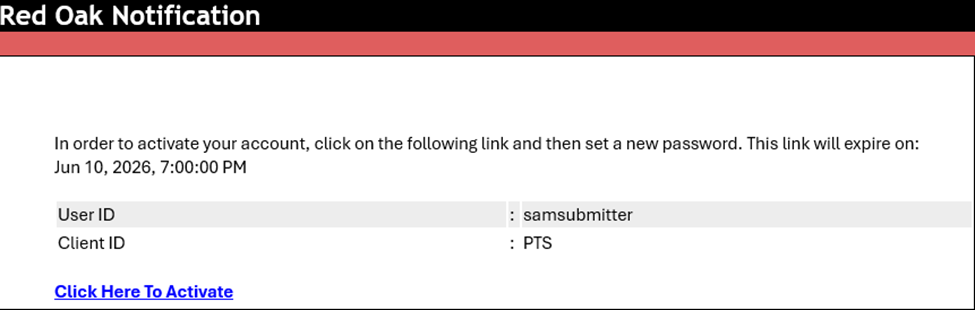
You will receive an email from AdMaster-no-reply@redoakcompliance.com. Follow the link in the email to set your password and activate your account.
Click the Click Here to Activate link and you will be prompted to set your password. Once your account activation is complete, you will be redirected to the login screen.
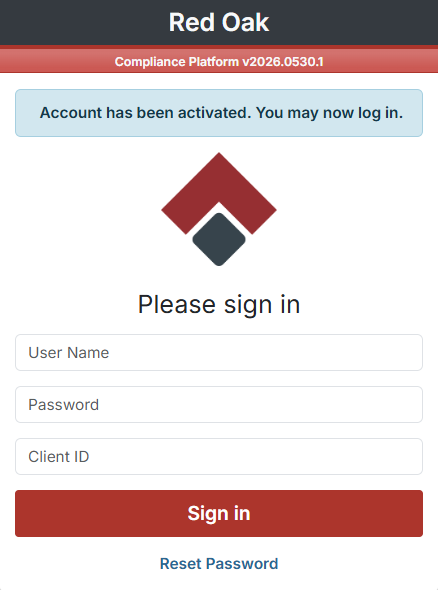
Once your account has been activated, enter the following on the login screen and click Sign In:
- User ID — Unique to you. Set by your administrator and provided in your initial activation email
- Password — Unique to you. Do not share your password with anyone
- Client ID — Specific to your organization, not to you individually. Provided in your initial activation email
2) Single Sign-On (SSO) Access
If your organization uses SSO, you won't need to log in here directly. Instead, follow the link your IT or compliance team provides, and Red Oak will open automatically after you authenticate through your company's system.
Tip: If you have not received an activation email or SSO link, contact your compliance department.
What to Expect After Logging In
Once you are logged in, you will land on your Home Page, which shows your active submissions pending your action. From here you can:
- Create new submissions
- Check the status of existing submissions
- Manage anything currently pending your action
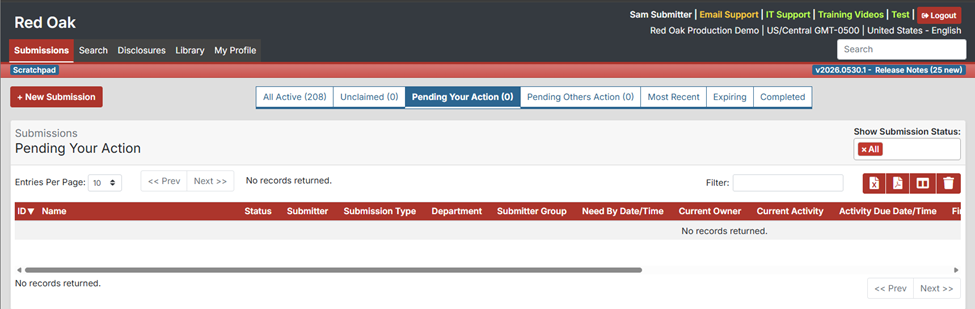
The Home Page is your central dashboard — everything you need to act on will surface here first. If your queue is empty on your first login, that is normal. Items will appear as submissions are routed to you.
Was this article helpful?
That’s Great!
Thank you for your feedback
Sorry! We couldn't be helpful
Thank you for your feedback
Feedback sent
We appreciate your effort and will try to fix the article